Blog

Thursday, 27 November 2014

7 online marketing trends you can't ignore in 2015

As you plan for your 2015 online marketing strategy, here are 7 trends that we expect to see and 7 actionable tips to benefit your strategy.

1) Mobile will continue to grow


During 2014 the amount of time we spend on our mobile has overtaken PCs. In a survey of US adults it was found that on average we spend 2 hours and 51 minutes on our phones vs 2 hours and 12 minutes on computers. Many companies have now moved to responsive websites which resize according to the screen the visitor is using but as we go forward into 2015 further optimisations for mobile will be necessary to maintain a share of mobile traffic.

One huge factor is load time. The average load time for a top 10 Google ranking website is 0.99 seconds. Search Engine Land recently reported that Google is experimenting with ways to favour in search results websites that are mobile friendly. Already Google takes into account user behaviour, penalising websites which visitors don’t stay on for long or look at many pages on – two behaviours which are directly affected by load time. Not only are there ranking benefits from a fast loading website, Amazon reported that for every 100 millisecond improvement in website load time, they see a 1% increase in revenue.

Tip 1: Make sure your website is mobile friendly, that it loads in under a second and that your content is easy to read and looks good on all devices.

2) Local SEO will become increasingly important


Research has shown that 50% of customers who performed a local search on their mobile visited a bick-and-mortar store within 24 hours of their search and 18% of these queries led to a sale. The fact remains that many people still prefer physical shopping to online shopping; there’s something about holding a product in your hands. A report by Accenture revealed that 82% of customers say they prefer shopping on the high street than online. Google understands the importance of providing the best local results to users and they’re fine tuning their algorithm to this end.

Tip 2: Local businesses with physical shops must make use of Google+ and local search so that they’re listed in search results for mobile users. (Oh and make sure you apply tip 1: to having a mobile friendly website!)

3) Specific targeting will be needed for success


The days of scatter gun marketing approaches are numbered. Best marketing results will be seen when businesses break down their customer base into segments and market specifically to those segments with the correct voice and tactics to reach that group. It also means more repurposing of content to promote it in a relevant way to each segment. A targeted approach is essential to make sure ROI of time spent creating and money spent advertising content is maximised.

Tip 3: Speak to your customers; find out their wants, needs, lifestyles and habits then tailor your approach to each group. Make sure that whatever you say fits in with the audience you’re saying it to.

4) Content will be expected to entertain


As more and more companies have embraced content marketing our lives have become even more flooded with content. To stand out from the noise content will need to become more than informative, it’ll need to be entertaining. Investment in video is becoming a must for brands that want to stay relevant and cutting edge.

Content is and will remain the driving force behind inbound marketing – especially since over 50% of 19 to 34 year olds will look at 4 or more sources before making a purchase. Now that the effectiveness of content marketing has been demonstrated, distribution will become just as important.

In 2015 we will see more of a focus on re-purposing and distributing to get maximum value from the content we create. Great content marketers will create different thumbnails according to platform, format restrictions and audience preferences so that campaigns consistently look good across all platforms. We’ll also see the same content being promoted in different ways, for example a topic might start out as an article, then an infographic, and then thumbnails and also as a Slideshare. This really follows on from Tip 3: knowing your audience and being specific with how you target different groups.

Tip 4: When you’ve created a great piece of content promote it across several platforms multiple times. Pull out nuggets of information and create interesting, engaging social posts about your content. Use images and video to create something that will stand out.

5) We’ll see more paid advertising


We’ve seen the rise and growth of social media success with many businesses adopting social for customer service and to reach out to new prospects. Now however there is increasing need to advertise on social platforms. With Facebook’s algorithm update it’s become increasingly hard to get content in front of consumers without advertising. This algorithm change lead to a 44% decline in brand content in users’ new feeds. LinkedIn, Twitter and Pinterest have followed Facebook and have all launched sponsored ads to put content in front of a specified group.

Tip 5: Budget for sponsored ads on social platforms, even £5 a day can dramatically increase your reach on Facebook. Once you invest, use analytics to measure your success and fine tune your strategy.

6) And more user reviews


Consumer reviews are certainly not a new trend but what we will see increasingly is companies asking customers to share their experiences become brand advocates. User generated content is invaluable. In the words of Jeff Bullas: “Reviews are a source of truth that will live on the web indefinitely”. It’s one thing saying you provide a great product or service, how much more valuable is it if your customers sing your praises for you? According to Neil Patel, customers are ready and willing to talk about great buying experiences: “50% will write about positive experiences, and 39% will write about negative”. Customers want you to wow them, and when you do they want to tell people about it.

There are various ways that you can collect reviews; on Google+, Trustpilot or with onsite review functionality. Collect reviews on Google+ one of the results when customers type your brand into Google will be your Google+ page with your shinning reviews. Companies that grasp this in 2015 will benefit from higher levels of trust and, consequently, better conversion rates.

Tip 6: Start asking customers to leave reviews on your Google+ page. We’ve written a couple of articles on the topic: 11 ways to encourage customer reviews and User Reviews: why they’re essential for e-commerce SEO.

7) We’ll expect increased personalisation


Another trend is increasing personalisation. More than ever customers are expecting companies to reach out to them personally. This is especially true of millennials who have grown up in the digital age and now have money to spend. They expect companies to court them for their business, they want to feel valued and personalisation is one way to do this.

Tip 7: Start sending out personalised follow up emails after cart abandonment. It shows that you do really value their purchase.

Thank you for reading.

Monday, 24 November 2014

5 Tips for starting out on Social Media


1) Create personality

Your social media activity needs to reflect your business and have a personality, so take time to think about your voice and which voice will connect best with customers.

2) Plan


Decide who your target audience is, which channels you want to use to best reach your audience, what your goals are and when and how often you will post.

3) Schedule

Once you’ve created your plan you can schedule a baseline of social updates, we like using Hootsuite. You can add retweets, responses and news updates to this baseline.

4) Be consistent


Consistent quality and volume is how you build an audience, scheduling your social media helps with this.

5) Use images and video

Visual content is so easy to absorb and stands out amongst text posts on the likes of Twitter, Facebook and LinkedIn.

We'll be publishing a blog post full of useful tips every Monday morning so why not follow us on Twitter so that you don't miss one!

Wednesday, 15 October 2014

11 of the best internet marketing infographics

Infographics have really surged in popularity over the last couple of years. And it’s no wonder really as visuals make a topic easy to understand and instantly digestible.

We've picked out 11 of our favourite infographics. Together they create a beginners guide to internet marketing, search engine optimisation, content marketing and social media marketing.

If you’re new to internet marketing, these infographics are a great place to start. And if you know your way around the world of internet marketing pretty well, we hope this blog post forms a useful bank of statistics for you.

1) The Periodic Table of SEO Success Factors (published 2013)


This infographic clearly explains the most important factors involved in SEO. It splits these factors into two groups, On-The-Page and Off-The-Page Factors with an explanation for each. Rating and colour coding the different factors between +3 for really effective SEO tactics and -3 for harmful practise, makes it obvious which to use and which to steer clear of.


Take away: Make sure you (or your SEO agency) only employ SEO tactics that have a positive rating in this table.

2) The Blogconomy (published August 2013)


The infographic starts with the heading “why blogging is good for your business”. Then it goes on to list over 50 different stats/pieces of information on blogging. Thanks to the hard work done by ignitespot collecting all of these valuable figures into one resource, it’s easy to see why and how blogging will grow your business.

Click for full infographic.

Take away: If you don’t blog, start now. It generates leads and will boost your website’s visibility in Google search results.

3) The Ultimate Guide to Social Media Image Dimensions (published February 2013)


We really like this infographic because it’s so useful! Anyone setting up or refreshing their company’s social media profiles will need to navigate the tricky world of multiple profile image and channel art dimensions. Thankfully, this lovely infographic collects all of this information in one place.

Click for full infographic.

Take away: Don’t settle for stretched images on your social platforms. Get them right.

4) The Best Times to Tweet, Pin, Tumble and Post (published May 2014)


One of the most common questions our clients ask on the topic of social media, is when should I Tweet, Facebook or post to Google+, this infographic puts this information at the tip of your fingers for the 6 most used social platforms.

Click for full infographic.

Take away: Be strategic about when you post on social media to see more engagement.

5) 22 ways to Create Compelling Content (published February 2012)


We talk a lot about content here at angelfysh. And rightly so. It’s one of THE most important factors when it comes to getting your website to the top of Google search results. unfortunately, deciding what to write about isn't always easy. This infographic has 22 ways for you to get your creative juices flowing.

Click for full infographic.

Take away: Get blogging!

6) How to Increase LinkedIn Engagement by 386% (published December 2013)


This infographic has some great tips on how to take your LinkedIn use from personal networking to generating leads and revenue for your business. It includes useful information such as when to post, and what to talk about.

Click to see full infographic.

Take away: Include links or images in your LinkedIn updates.

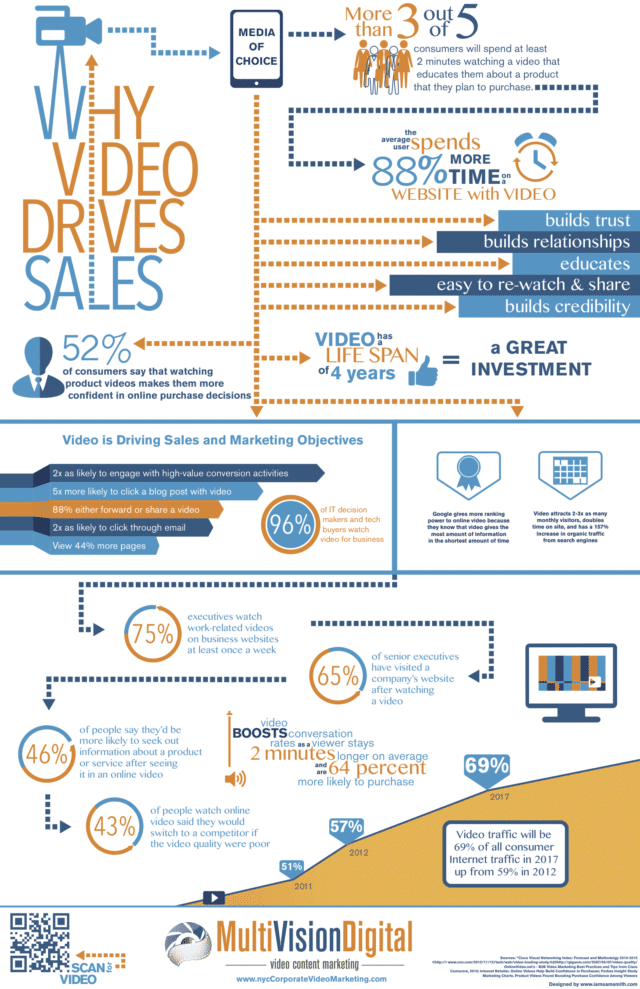
7) Why Video Drives Sales (published October 2013)


Content marketing isn’t just about written content, it includes video too. This infographic shows why every company must include videos as part of their marketing strategy – e.g. 75% of executives watch work-related videos on business websites at least once a week. And! Video traffic will account for a huge 69% of all consumer internet traffic by 2017.

Click to see full infographic.

Take away: Don’t just leave video to the ‘big players’ in your industry. Take the lead and add videos into your internet marketing strategy.

8) Mobile Marketing (published May 2012)


Did you know that 46% of users who view a product on their phone are actually standing in the store? And by 2015 43% of mobile users will make purchase on their phones. This infographic contains loads of great statistics on mobile usage which you can use to inform your mobile marketing strategy.

Click to see full infographic.

Take away: Make sure your website is responsive. A responsive website will resize to fit the screen (laptop, tablet, mobile etc.) being used to view the website.

9) The New Multi-Screen World (published August 2012)


Google has created this neat little infographic which contains some really interesting information on cross-platform consumer behaviour. By cross platform we mean shoppers who use more than one device in their buying journey. For example, 67% of people use two devices when shopping such as a phone and a computer.


Take away: Make sure your website is responsive, easy to navigate and easy to checkout on multiple devices.

10) Why Visual content Marketing Delivers Results (published September 2014)


This is really an infographic on why infographics work! If you’re still to be convinced of their merit here are some statistics that will leave you without any doubt of their effectiveness to engage.

Click for full infographic.

Take away: What subject could you create an infographic on to engage new leads or customers?

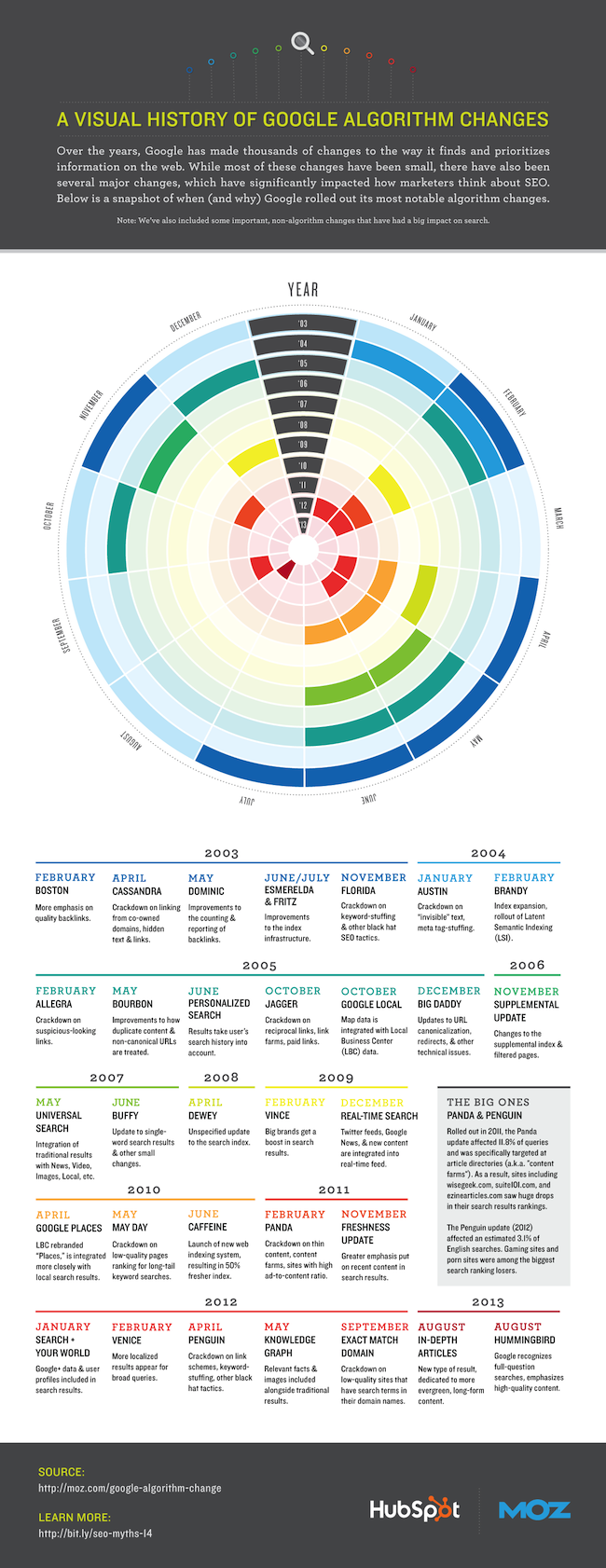
11) A Visual History of Google Algorithm Changes (published February 2014)


This infographic will give you a snapshot overview of the background of SEO today. It eloquently summarises the changes Google has been making to the way it finds and ranks websites over the last decade.

Click for full infographic.

Take away: Google will favour websites with quality content and quality links.


We hope you've found this interesting! If you've got a favourite infographic, please let us know in the comments below. Please also share this post with your own followers. Thank you.

Tuesday, 30 September 2014

Happy Birthday Google


Yesterday was Google's 16th birthday.


That means I've been been optimising websites & working in the online marketing industry since Google was a 1 year old.

Makes me feel old!

Monday, 29 September 2014

Ranking factors: How does Google decide the order of its search results?

This is an easy question to ask - but a hard one to answer! It’s the £500 million question behind the Search Engine Optimisation (SEO) industry.

Whilst the algorithm that Google uses is a closely guarded secret, we can go a long way to answering this question by studying search results in-depth. That’s exactly what searchmetrics have done.

They've recently released their annual ranking factors report comparing the top 30 results for the 10,000 most searched for terms on google.com.

In today’s blog post we’ll summarise the findings of their report including the factors which show the strongest correlation for search engine success. If you have a website for your own business, please read on as there’ll be some tips that you can implement to help your SEO.

First of all, what is a ranking factor? 


A ranking factor is an aspect of a website which affects where it will be positioned in search engine results. These factors are combined and weighted by Google’s very complex algorithm to determine the ranking of that website in its search results.  Some examples of ranking factors are: relevant keywords, back links, site load speed.

Types of ranking factors


In their report, searchmetrics divided the ranking factors into four groups:

Onpage technical: These factors describe the technical build of the website. For example how long the website takes to load or how the website is structured.

Onpage content: These factors look at the content of the website. For example word count, or the number of relevant keywords.

Back links: These factors measure different aspects of a websites back link profile, for example, the percentage of nofollow links and how well those websites giving a link back rank in Google.

Social: These factors measure how much the URL has been talked about on social media. For example how many times a website has been shared and liked on Facebook.

User signals: These are factors that describe the users behaviour, such as how many searchers click through to the website from the search results page or how long they spent on the website. These factors tell Google how useful or relevant users found a particular website for a particular keyword.

The results


Now on to the actual results from the study in chart form. How to read the chart:
  • The numbers next to the circle show the average value across the top 10 results for that ranking factor.
  • The longer the bar, the higher the correlation between the factor and a high Google ranking.
  • A negative bar is best interpreted by reversing the statement.


What we can learn from these results?


Onpage technical tips

  • Make sure your website loads quickly, average load time for a website on page 1 of Google was 0.99 seconds.
  • 98% of the URLs studied had a meta description. Make sure your website has expertly written meta descriptions and titles.
  • Internal linking structure is important, it should be easy to navigate.
  • Make sure you keep your website up to date.
  • These factors are a basic starting point if you want your website to be ranked high up on Google because if they are absent they will have a negative effect on your rankings.

Onpage content tips

  • Write your content for the user. All copy should be easy to understand and well written.
  • Top results had longer content, the average word count for a page 1 result was 975 words.
  • Images and video content are important whereas ads aren’t helpful.
  • Include a range of relevant related keyword terms in your copy instead of repeating an exact keyword.

Back link tips

  • Back links are still one of the most important ranking factors.
  • Quality is more important than quantity. Back links from websites that are themselves positioned well on Google are more valuable than those that aren't.
  • Anchor text, the clickable text of a link, should be brand or domain name based and not keyword based.
  • Build a balanced back link profile with some links pointing to the homepage but with a larger number pointing to specific pages within your website.

Social tips

  • Promote your content on social media. Social signals such as likes and shares tell Google that your website content is good. On average, a Google page 1 listed URL had 143 Google+ Plus ones, 1,690 Facebook signals, 162 Tweets, and 36 Pins. We've written a blog post especially on this topic.

User signal tips

  • Making your website engaging to keep users on your website for longer is also important. The average time spent on a Google page 1 URL was 101 seconds.
  • Encouage users to visit more than one page of your website. If a user only visits one page of your website this counts as a ‘bounce’. Websites with a lower bounce rate are on average ranked higher. The average bounce rate for a page 1 URL was 37% of users.

In summary, high quality content along with a balanced, quality back link profile are essential for websites wishing to be ranked prominently in Google. Technical factors such as page load speed are crucial but will not get your website positioned if you don’t have great content.

SEO takes time and consistent effort. So keep adding useful quality user focused content to your website whilst you apply these tips.

You can find the original report by searchmetrics here.

Monday, 22 September 2014

Effective & brilliant homepage examples - Part 2

Today we’re following on from Effective & brilliant Homepage Examples - Part 1 blog post with 5 more examples of household brands with brilliant home pages.

Your homepage is the starting point for most of your customers. So what can we learn from these examples of great homepages that will get more of your customers from your homepage and on to their buying journey...

Example 1: mySupermarket


This website helps you find the best deals on your grocery shopping by comparing your basket across different stores.


What’s good about it?

1.This website clearly describes how it’s going to help you and why you should use it at the very top of the page. (And in fewer words than this bullet point!)

2.There is one stand out call to action - ‘Start shopping’- and it follows straight after the above reasons to use mySupermarket. It’s obvious where to click. This is so important because if a visitor doesn’t navigate to a second page on your website it will count as a ‘bounce’ and Google doesn’t like websites with high numbers of bounces.

3.The navigation menu is pictorial. Since 65% of people are visual learners, this makes site navigation instantly intuitive.

4.The search bar is prominently positioned. This is a must for ecommerce websites.

5.For mobile visitors there are links to download the app front and centre of the homepage. This shows that they’ve really put a lot of thought into caring for their mobile customers.


6.There is a ‘real’ up to date example of the kind of deals mySupermarket can offer. Today’s was kiwis, 50% off.


7.The stores that are compared to give you your bargain basket are displayed across the screen so that you can see exactly what your options are.


Example 2: Dyson


This household brand almost doesn’t need an introduction – Dyson make vacuums that don’t lose suction. And this is clearly conveyed by their homepage.


What’s good about it?

1. Front and centre there is a compelling reason to buy from dyson.co.uk and not a competitor – you save up to £110.

2. The imagery is truly stunning. It’s obvious straight away that the products are beautiful engineered and built.

3. We really like the help me choose button, it’s customer focused and helpful.


4. Navigation is clean and simple.

5. Social media icons are displayed at the top and in the footer.


Example 3: Thomas Cook


Package holidays, hotels and flights.


What’s good about it?

1. The search form on the homepage is clean and simple to use, and it auto fills the airport based on your location. It’s little details like this that make an online experience more enjoyable, which is very important when booking a holiday.

2. Above the fold, you’re shown beautiful sun soaked beaches. When you hover over these images you’re given more information about that particular deal. This is a nice feature for the user and it provides extra information to Google.

3. Below the fold you are given detailed information on why you should choose Thomas Cook as well as pros for a few example resorts. For example ‘family beach resorts’, ‘late breakfast’ and ‘free Wi-Fi’. Exactly the kind of information you need.


4. At the bottom of the page there is detailed information on the website’s security. This is well considered since customer peace of mind is so important when it comes to large purchases such as holidays. There’s also information on the payment options available.

5. There are links to 6 different language versions of the website.


Example 4: Barker & Stonehouse


The ecommerce website for the stylish, modern home furniture company Barker & Stonehouse.


What’s good about it?

1. The above the fold slider shows beautiful furniture in a home setting, and right below, the individual products are displayed. This makes it’s easy to see where to go next if you like what you see.

2. There’s a phone number to call right at the top in bold for those who want to place an order over the phone.

3. Order tracking options are also prominently positioned, right where you’d expect it to be.

4. Click & collect, stock check and finance options are clearly displayed and explained on the homepage. All of these make it easier for the customer to get their hands on the product faster.


5. There’s a link to their blog. And I want to click through to their blog because it tells me what to expect. Tips and inspiration.


Example 5: British Gas


Gas and electricity supplier.


What’s good about it?

1. The copy on this homepage is very customer focused. ‘How can we help you?’ … ‘services most suited to your needs’.

2. Actions are clearly laid out for the visitor to choose from according to what type of homeowner they are – making something which could be quite complicated, simple.

3. This website is responsive – it adapts to the size of your screen – so it is just as easy to navigate on a mobile device.


4. It’s also super easy to download the British Gas app for mobile visitors.


That's it's for now. Thank you for reading, hope you've come away with some useful ideas to improve your own homepage. 

If you've not read part 1, you can find it here.

Monday, 15 September 2014

10 Tips on how to promote your blog posts after you hit publish (+ 6 links to another 159 tips!)

How to promote your blog content and news articles


Okay you've spent hours researching, crafting and polishing the perfect blog post and you've hit the publish button.

So now all you have to do is sit and wait for all the lovely traffic to pour in right?

Wrong.

Now you need to start actively promoting it and engage with new readers.

Here's 10 tips to help you promote your blog post


1. Make sure you choose a compelling title for your blog post. Something people will want to click on.

2. Promote via social networks. Tweet to Twitter. Post to Facebook, Google+ and LinkedIn. Images and infographics to Instagram and Pinterest. Videos to YouTube etc.

3. Take your blog post, turn it into a pdf and upload to SlideShare and other document sharing websites. This works well for 'how-to', 'lists' and 'top 10' type blog posts.

4. Feature and link to influential websites, blogs and brands in your market from within your blog post. And let those people know on social media that you've featured them in your blog post. They'll most likely reward you by sharing and re-tweeting (IF your content is good enough though).

5. If your blog post contains statements, facts and figures, make sure you back them up with references and quotes from experts in this niche. Include a 'click to tweet' option for quotes. Then again let those people know via Twitter etc that you've featured them.

6. Get to know who the authorities in your market are. Network with them. Share their content. This again will get you noticed and could generate some 'shares' from them.

7. Make sure you encourage your readers to share your blog post. Place social share buttons at the bottom of your blog post (you could include share buttons at the top too). And ask people to share.

8. If you have a database of email subscribers make sure you do a mail shot each time you publish a new blog post.

9. Find forums in your niche and become part of the community. Join in with conversations, offer help and advice but don't over-promote your blog posts just yet. And take the time to read the forum rules first.

10. Make sure you re-share your blog post again across various social networks. Use the image below as a guide on how often to share across Twitter, Facebook, Google+ and Tumblr.

http://www.searchenginejournal.com/blogging-101-traffic-generation-blogs-budget/109627/

The original source of this image can be seen across at Search Engine Journal in this post Traffic generation for blogs on a budget

And the additional 159 tips I promised are...


31 ways to promote your blog courtesy of Stuart at NicheHacks (good stuff in here).

Rebekah Radice's post 25 Smart ways to promote your latest blog post will also give you some good ideas.

14 ways to promote your blog posts after you publish was written earlier this year by Jessie Joathome across at BlogHer and is worth reading.

Samuel Pustea wrote this useful article 50 ways to promote and market your blog post.

There's a nice infographic at Marketing Land showing 30 ways to promote your blog posts.

And another infographic entitled 9 powerful blog promotion tactics can be seen across at Social Marketing Writing.

Thank you for reading. If you've enjoyed this post please do share it.